


As video surveillance for Desktop continues to evolve, it is no longer enough for businesses to simply record footage and store it for later review. Modern organizations require real-time information systems which automatically detect threats to produce valuable data that helps them prevent incidents while they improve operational efficiency and create superior business decisions.
The Desktop App now features video analytics which serves B2B telecom clients who need strong desktop security tools for their security work and monitoring of multiple sites.
The system now enables advanced video analysis which used to require specialized expertise from trained professionals. The system has become accessible to all users who can use it in a simple way for their daily needs.
The Industry Problem: When Technology Becomes the Obstacle
Despite rapid advances in AI and computer vision, many organizations struggle to get real value from video analytics. A recent UK study revealed that 27% of decision-makers suffer from excessive CCTV false alarms, primarily due to systems that are:
- Poorly configured
- Too complex for non-technical staff
- Difficult to maintain over time
The systems create additional problems than their intended solutions because they produce excessive system interference which leads to work-related tension that reduces operational performance. It generates too many alerts which causes operators to become overwhelmed while they fail to detect important incidents and the system loses user confidence.
The existing difference between what technology can do and what users actually achieve stems from usability issues rather than technological limitations.
Our Philosophy: Video Analytics for Everyone
We believe that video analytics should not require a PhD in computer vision. Most businesses need tools that are:
- Easy to understand
- Quick to deploy
- Reliable in real-world conditions
Our design method Concentrates on creating interfaces which regular users can understand. The Desktop in Release 25.12 version eliminated unnecessary complexity to develop analytical tools which function independently from any additional configuration requirements.
The goal is simple: maximum value with minimum effort.
What Video Analytics for Desktop Delivers the Real Simplicity
In this release, video analytics becomes part of the Desktop application, which is particularly important for those who use the desktop as their primary tool for daily video surveillance and monitoring.
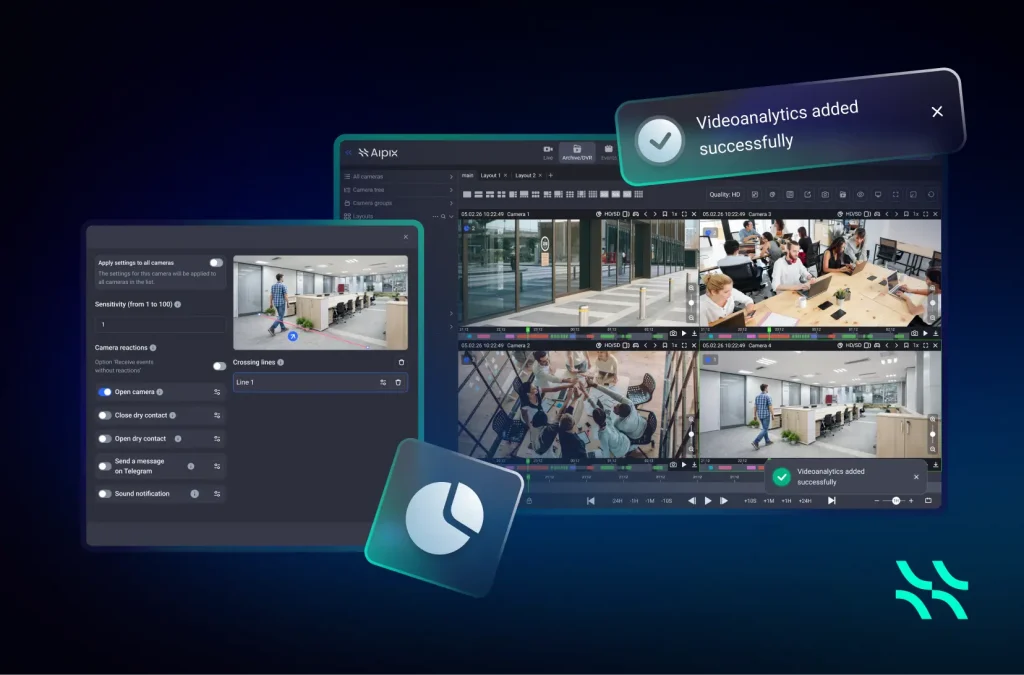
A Complete Set of Real-World Video Analytics Detection Scenarios
Desktop now includes a full suite of practical analytics cases that cover the most common business needs:
- Zone intrusion detection for restricted areas
- Line crossing detection for entrances, exits, and perimeters
- Camera tampering or damage detection to protect infrastructure
- Loud sound detection for abnormal events
- Fire and smoke detection for early emergency response
- People counting within defined areas for operational insights
These scenarios enable organizations to move from passive monitoring to proactive incident prevention.
Result:
Better coverage of distributed sites, instant alerts when something goes wrong, and consistent data for compliance and performance reports.
One-Click Analytics for Entire Layouts
The process of handling big video walls together with multiple locations across different sites used to need people to do everything by hand. With Video Analytics for Desktop in Release 25.12, this changes completely. Users can now add analytics cases to every camera in a layout with a single click. The system enables fast deployment operations through automated task execution which used to need manual operation at a slow pace.
Result:
Significant time savings, reduced configuration errors, and higher efficiency for security teams managing dozens or even hundreds of cameras.
Video Analytics Context Menu Configuration
Users can access analytics functions through their camera interface by choosing the option from the context menu. No separate screens, technical forms, advanced parameters. The system applies default settings which enable analytics to begin operation right away.
Result:
A seamless setup experience that enables even non-technical users to deploy intelligent monitoring in seconds.
Clear Visual Indicators of Cameras with Video Analytics
To simplify everyday operations, cameras with active analytics are now marked with a dedicated icon. Operators can instantly see which cameras are running analytics scenarios without opening settings or dashboards.
Result:
Improved situational awareness, faster navigation, and easier system management.
Video Analytics for Desktop as a Telecom Business Growth Solution
The Video Analytics for Desktop system provides more than video analytics because it delivers a user-friendly interface which enables subscribers to access its features with greater simplicity. From configuration to everyday use, it has become simpler and faster, allowing telecom providers to expand their service portfolio with profitable and valuable solutions based on Aipix. Telecoms and ISPs now have access to Video Analytics service which provides them with three main advantages: they can generate additional revenue by selling premium services and they can differentiate their business through this service and establish themselves as market leaders because of its user-friendly analytics system which works for non-technical users.
Discover the new Video Analytics in Aipix Desktop 25.12 and how telecoms and ISPs are making smart surveillance simpler and more valuable.





 EN
EN  ES
ES  FR
FR  PL
PL  PT
PT