

Is it possible to scale a cloud video surveillance service while keeping infrastructure flexible and resource-efficient?
A video surveillance media server sits at the center of workload. Every additional stream creates load across several infrastructure layers.
Aipix Mediaserver provides one example of how this type of infrastructure can be organized. Its architecture combines stream capture, recording, archive management, and media delivery within a single media-processing layer.
Depending on hardware and workload, one Mediaserver node can process up to 5,000 streams. However, stream count alone does not determine whether a deployment is efficient. Scalability also depends on how processing resources, storage, bandwidth, recording policies, and redundancy are designed.
What is a cloud video surveillance media server?
A video surveillance media server is a component that processes multimedia streams between cameras, storage systems, applications, and viewers.
Its main responsibilities typically include:
- receiving video and audio streams;
- processing incoming media;
- recording footage;
- managing archives;
- providing access to stored video;
- delivering live streams;
- delivering archived video.
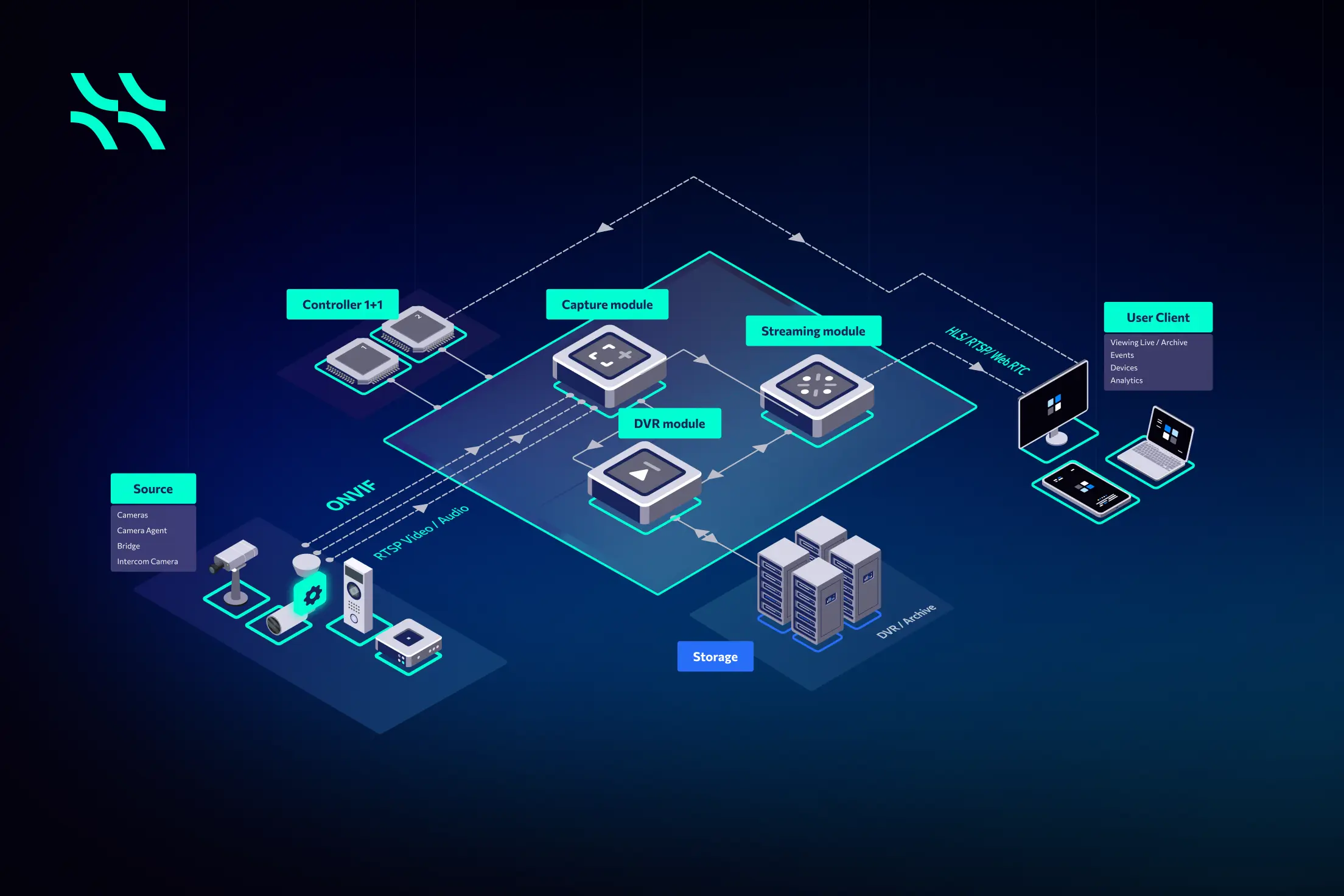
In Aipix Mediaserver, these functions are divided between several core components, including Capture, Streaming, and DVR.
The Capture component connects to cameras and other media sources and receives incoming streams. The DVR component manages recording and video archives. The Streaming component delivers both live and archived media to applications and users.
The overall media flow can be represented as:
Camera or stream source → Capture → RTP processing → Streaming and/or DVR → Video delivery
This architecture keeps the main media operations within one processing layer while separating the responsibilities of stream acquisition, recording, storage, and playback.
How does the Capture module process incoming streams?
Before video can be recorded or delivered to viewers, Mediaserver must establish and maintain a connection with the camera or another stream source.
This task is handled by the Capture module.
Capture provides an API for internal Mediaserver modules that need access to video streams and supports RTSP stream acquisition using both TCP and UDP transport.
Once a stream is received, Capture processes the incoming RTP packets, which carry the media data.
Two handlers are involved in this process:
- Streamer — created when a stream is added to Mediaserver. It processes incoming RTP packets and forwards them to the components responsible for video streaming.
- Recorder — created when recording is enabled for the stream. It processes the same incoming RTP packets and forwards them to the DVR/archive subsystem.
This architecture allows a single captured camera stream to be used for several purposes simultaneously.
For example, a live stream can be delivered to a user while the same stream is also being recorded into the archive.
Separating Capture from recording and playback also helps organize media-processing responsibilities as deployments grow.
How many streams can the video surveillance media server process?
According to the documented reference configuration, one Mediaserver node can process up to 5,000 video streams, depending on hardware and workload.
This processing can include stream capture, archive recording, and content delivery.
For the 5,000-stream reference scenario, the approximate infrastructure configuration is:
- 32 vCPU;
- 160 GB RAM;
- 128 GB SSD;
- 2 × 10 Gbit/s network adapters;
- up to 3,000 TB HDD for 30 days of archive storage.
These figures should not be interpreted as fixed requirements for every deployment.
Actual resource consumption depends on factors such as:
- number of streams;
- camera bitrate;
- resolution;
- codec;
- recording mode;
- retention period;
- archive size;
- number of viewers;
- incoming and outgoing network traffic.
This distinction is important when estimating infrastructure costs. Two deployments with the same number of cameras can require very different amounts of compute, storage, and bandwidth.
Video surveillance media server scaling with camera number growth
Scalability has two main dimensions: increasing the capacity of an existing node and adding more nodes.
Aipix Mediaserver supports both vertical and horizontal scaling.
Vertical scaling means increasing the resources of an individual server, such as CPU and RAM.
Horizontal scaling means adding more Mediaserver nodes and distributing the workload between them.
The documented reference configurations illustrate how hardware requirements change as stream count increases:
| Video streams | vCPU | RAM | Network | Reference 30-day HDD |
|---|---|---|---|---|
| 200 | 4 | 16 GB | 1 Gbit/s | 60 TB |
| 500 | 8 | 48 GB | 2 × 1 Gbit/s | 300 TB |
| 1,000 | 12 | 64 GB | 10 Gbit/s | 600 TB |
| 2,000 | 16 | 80 GB | 10 Gbit/s | 1,200 TB |
| 5,000 | 32 | 160 GB | 2 × 10 Gbit/s | 3,000 TB |
The table demonstrates why stream count should be treated as a sizing input rather than the only scalability metric.
As deployments grow, different infrastructure resources may increase at different rates.
For example, a larger number of viewers may increase outgoing network traffic without significantly changing archive storage requirements. A longer retention period may dramatically increase storage requirements without changing the number of incoming streams.
Fault tolerance and redundancy for VSaaS availability
A large video surveillance deployment also needs to account for server failures.
If thousands of camera streams depend on one processing node, a failure can affect a significant part of the service.
This is why fault tolerance and redundancy are important in multi-server environments.
Aipix Mediaserver can operate with Controller in a configuration where workloads can be redistributed between servers. If one server becomes unavailable, streams can be redirected to another available node.
The practical value of this approach is not limited to backup.
It reduces dependence on a single processing server and allows capacity planning and resilience to be considered together.
In a larger deployment, additional nodes can therefore serve two purposes:
- increasing processing capacity;
- improving service continuity if another node fails.
For operators, this is an important distinction. Scalability without redundancy can increase capacity while still leaving the platform vulnerable to individual server failures.
How can a video surveillance media server help optimize storage?
Storage is one of the largest infrastructure requirements in cloud video surveillance.
The amount of storage required depends heavily on camera bitrate, recording mode, video compression, scene activity, and archive retention period.
The 3,000 TB figure associated with the 5,000-stream reference configuration is based on a defined archive scenario rather than being a fixed requirement for every deployment.
The reference calculation assumes:
- approximately 2 Mbit/s per video stream;
- continuous 24/7 recording;
- 30 days of video retention.
Different recording strategies can significantly change storage requirements.
Aipix Mediaserver supports several archive recording modes, including:
- continuous recording;
- recording on demand;
- event-based recording;
- scheduled recording;
- thinned recording.
This means operators can define archive policies according to the requirements of each camera or use case instead of applying the same recording model to every stream.
Continuous recording
With continuous recording, the video stream is archived without interruption.
This approach is suitable when operators need a complete visual history from a camera, but it also creates the highest storage requirements.
Recording on demand
On-demand recording starts and stops following a client request.
This can be useful when recording is required only for specific situations, investigations, or temporary monitoring tasks.
Scheduled recording
Scheduled recording activates archive recording according to a predefined timetable.
For example, a camera could be configured to record continuously during business hours but use another recording strategy outside those hours.
Thinned recording
Thinned recording reduces the amount of data written to the archive.
Several approaches can be used.
With continuous thinning, only key IDR frames are recorded.
In another configuration, full recording can start only when requested by a client.
Scene-activity-based recording provides another option. When there are no meaningful changes in the image, the system can record only IDR frames. When activity is detected in the scene, an event can trigger full-stream recording.
This makes it possible to reduce archive consumption while still preserving more detailed footage when something important occurs.
Event-based recording to reduce unnecessary archive usage
Event-based recording is designed for scenarios in which continuous 24/7 recording is unnecessary but operators still need meaningful footage around an incident.
The challenge is that recording only from the exact moment when an event is detected can remove important context.
A person may enter the scene several seconds before motion detection is triggered, for example.
To solve this problem, Aipix Mediaserver maintains a rolling video buffer for streams configured for event-based recording.
Two parameters control the process:
- Stream depth (X) — determines how many seconds of recent video Mediaserver retains in the buffer. The supported range is 5 to 120 seconds.
- Timeout (Y) — determines how long Mediaserver continues recording after receiving an event trigger. The supported range is also 5 to 120 seconds.
As new video cycles arrive from the camera, they are written into the buffer.
Once the configured buffer depth is reached, the oldest data is removed as new video arrives. As a result, the buffer always contains the most recent period of footage.
When an event is triggered, Mediaserver checks whether archive recording for that stream is already active.
If recording is not active
Mediaserver extracts the footage currently stored in the buffer and places it at the beginning of the new archive recording.
It then continues recording the current live stream into the same archive file.
Recording continues for the configured post-event timeout.
The resulting archive can therefore contain:
Pre-event footage → Event → Post-event footage
For example, if the stream depth is configured to 30 seconds and the post-event timeout is 60 seconds, the archive can contain up to 30 seconds of video preceding the event and continue recording for 60 seconds after the event is received.
Before the recording ends, Mediaserver resumes filling the buffer so that pre-event footage is available again if another event occurs.
If recording is already active
If another event is received while recording is already in progress, Mediaserver does not need to start a completely separate recording.
Instead, the system extends the existing recording period by the configured timeout.
The point at which buffering resumes is also shifted accordingly.
This approach preserves useful event context while avoiding the storage consumption associated with continuous recording for every camera.
Which video and audio codecs does Aipix Mediaserver support?
Codec support is important because surveillance networks often contain cameras and devices from different manufacturers and generations.
Aipix Mediaserver supports commonly used video codecs including:
- H.264, also known as Advanced Video Coding (AVC) or MPEG-4 Part 10;
- H.265, also known as High Efficiency Video Coding (HEVC) or MPEG-H Part 2.
H.264 remains one of the most widely used codecs in video surveillance and provides a practical balance between compression efficiency, compatibility, and processing requirements.
H.265 can provide greater compression efficiency than H.264, potentially reducing the bandwidth and storage required for comparable video quality.
Documented audio capabilities include:
- AAC transcoding;
- PCMA;
- PCMU;
- G.711.
In mixed-camera environments, codec support is particularly important because operators may use equipment from several manufacturers across different generations.
A media server that supports the codecs already used by the camera fleet can process streams without requiring operators to standardize every device on the same media format.
How does a surveillance media server deliver live and archived video?
A cloud surveillance platform must deliver video to different applications, devices, and user environments.
The Streaming module in Aipix Mediaserver is responsible for delivering both live streams and archived video.
It supports several playback technologies:
- RTSP Live — live video streaming via RTSP;
- RTSP DVR — archived video playback via RTSP;
- HLS Live — live video streaming via HLS;
- HLS DVR — archived video playback via HLS;
- WebRTC Live — low-latency live video delivery;
- WebRTC DVR — archive playback via WebRTC;
- archive export using fragmented MP4;
- archive export as TAR.
Using several delivery protocols gives applications flexibility in how video is presented to users.
RTSP
RTSP, or Real-Time Streaming Protocol, is commonly used to establish and manage media-streaming sessions.
It is widely used within professional video and surveillance environments and supports operations such as playback, pause, stop, and navigation through recorded media.
HLS
HLS provides HTTP-based media streaming and can be used for both live and archived video playback.
It is particularly useful in environments where video needs to be delivered through web infrastructure or to a wide range of client devices.
WebRTC
WebRTC enables real-time audio, video, and data transmission between applications and browsers.
Its low-latency characteristics make it suitable for scenarios where minimizing the delay between camera capture and user playback is important.
Different protocols can therefore be selected according to application architecture, latency requirements, network environment, and playback scenario.
Live and DVR player handlers
Internally, the Streaming module uses dedicated handlers for different playback scenarios.
HLS Live, RTSP Live, and WebRTC Live handlers process requests for real-time video.
HLS DVR, RTSP DVR, and WebRTC DVR handlers process requests to view footage stored in the archive.
For archive playback, the DVR player retrieves the required RTP packets according to the requested stream identifier and timestamp.
This allows users to navigate through recorded footage without establishing a new capture session with the original camera.
The same Mediaserver infrastructure can therefore support both live viewing and archived playback while keeping Capture, storage, and playback responsibilities separate.
How does Mediaserver manage video archives?
Recording video is only one part of archive management.
As archive size grows, the system also needs to determine:
- how recordings are segmented;
- where they are stored;
- how long they remain available;
- when old data should be removed;
- how footage can be retrieved and exported.
The DVR module handles these responsibilities.
By default, DVR recordings are created in two-minute segments. The recording duration can be adjusted when the stream is configured through Controller.
Recorded data is automatically stored in the configured local storage directory.
Retention settings define how long archived footage remains available. When the retention period expires, older recordings can be automatically deleted so that storage can continue to be used for newer footage.
The archive can also be completely deleted following a client request.
Archive quotas and recording policies provide additional mechanisms for controlling storage consumption.
For large VSaaS deployments, this makes archive management a fundamental infrastructure capability rather than only a playback feature.
Which archive formats can be exported?
Surveillance footage often needs to be used outside the primary video platform.
Operators may need to provide footage for investigations, share it with third parties, create short previews, or transfer recordings into another system.
Aipix Mediaserver supports several archive export formats.
MP4
MP4 is one of the most widely supported video container formats.
It is suitable when recorded footage needs to be played using common desktop, mobile, and media applications or shared outside the surveillance platform.
fMP4
Fragmented MP4, or fMP4, divides media into smaller fragments.
It is particularly useful in streaming-oriented architectures because individual fragments can be processed and delivered without waiting for an entire media file to be completed.
Snapshot MP4
Snapshot MP4 provides access to selected moments within recorded material.
It can be useful when operators need quick access to a particular point or event without reviewing the entire archive.
Preview MP4
Preview MP4 provides a shorter representation of recorded material and can help users assess footage before opening or exporting the complete recording.
Raw archive
Raw archive export preserves the archive data in its original stored representation.
This can be useful for workflows in which the original media data needs to be retained for further processing, analysis, migration, or specialized examination.
Supporting multiple export formats allows archive storage and external video usage to remain separate concerns.
Operators can keep footage inside an archive structure optimized for the platform while exporting it into a format appropriate for users or downstream applications.
Playback of DVR recordings without recapturing the camera stream
One important characteristic of the DVR architecture is that archived footage can be played independently of the current camera capture session.
When a user requests historical footage, the DVR player loads the required data from the archive according to the stream and requested timestamp.
The system does not need to reconnect to the camera and recapture the original footage.
This is particularly important in large video surveillance environments because archive playback can create substantial user traffic of its own.
Separating historical playback from camera capture reduces unnecessary interaction with cameras and allows stored footage to be delivered directly from archive infrastructure.
Can a video surveillance media server use different storage resources?
Compute and storage do not necessarily grow at the same rate.
A deployment with many cameras and a short retention period may require significant processing capacity but relatively limited archive storage.
Another deployment may process fewer streams but retain footage for much longer.
Aipix Mediaserver supports configurable DVR storage using defined physical storage locations and mount points.
This allows storage infrastructure to be planned independently from the CPU and memory resources used for stream processing.
Separating these requirements can make infrastructure planning more flexible.
Compute capacity can be increased as stream-processing demand grows, while storage can be expanded according to archive depth, camera bitrate, and recording policies.
Cost-efficiency of VSaaS with a video surveillance media server
There is no single configuration that makes every video surveillance system cost-efficient.
Efficiency comes from matching different infrastructure resources to the workloads they actually support.
For example:
- processing capacity should follow stream volume and complexity;
- storage should follow recording and retention requirements;
- network capacity should follow incoming and outgoing media traffic;
- recording modes should reflect the operational importance of each stream;
- delivery technologies should match application and latency requirements;
- redundancy should reflect service-availability requirements.
Recording policy can have a particularly significant impact on infrastructure costs.
A camera that records continuously generates a very different storage workload from a camera using event-based or thinned recording.
Likewise, an installation with relatively few cameras but many concurrent viewers can create a higher outgoing bandwidth requirement than a much larger camera deployment with limited live viewing.
This is why a video surveillance media server should be evaluated as part of a broader architecture rather than by stream capacity alone.
A server capable of processing thousands of streams is valuable, but the overall deployment still depends on how efficiently capture, storage, networking, recording, playback, and failover are configured.
Building a scalable video surveillance service
The central challenge in cloud video surveillance is not simply supporting more cameras.
It is managing the combined workload created by those cameras.
Each stream affects processing, networking, storage, archive management, and video delivery.
As deployments grow, these requirements become increasingly interconnected.
A well-designed video surveillance media server architecture therefore needs to provide more than high stream capacity. It should allow processing, storage, bandwidth, recording policies, and redundancy to scale according to their own requirements.
Aipix Mediaserver illustrates this approach by combining stream capture, RTP processing, archive recording, media delivery, flexible recording modes, storage management, archive export, and multi-server scaling within one media-processing layer.
The separation of Capture, Streaming, and DVR functions also helps create a predictable media workflow:
Camera → Capture → RTP processing → Live streaming and/or archive recording → Storage → Playback or export
For VSaaS infrastructure planning, the key lesson is broader than any individual product.
Efficient scalability comes from understanding the complete media workload and scaling each resource according to actual demand.
To learn more about Aipix Mediaserver capabilities for efficiently launching and scaling a video surveillance service, contact the Aipix team for a detailed presentation.
To learn more about Aipix Mediaserver capabilities for efficient launch and scaling of the video surveillance service – contact our managers for in-detail presentation.





 EN
EN  ES
ES  FR
FR  PL
PL  PT
PT