
Video analytics service sizing: a separate infrastructure layer for scalable monetization
Video analytics service is a dedicated infrastructure domain within an AIPIX deployment. Although analytics consumes video streams from the media layer, it follows a fundamentally different sizing model from recording and archive storage.
Once analytics becomes part of the commercial service, the operator needs a dedicated compute layer together with the database and supporting storage infrastructure required to operate it reliably.
This distinction is important not only from a technical perspective, but also for CAPEX planning and service monetization. Analytics best introduced as an additional, revenue-enabling layer on top of a production-ready video platform rather than being included in the initial infrastructure by default.
Why to size video analytics service separately
Media recording and analytics generate different types of infrastructure load.
The media layer primarily driven by:
- number of cameras;
- aggregate video bitrate;
- archive retention;
- recording mode;
- continuous versus event-based recording.
The analytics layer, by contrast, driven by:
- number of analytics cases;
- complexity of the analytics logic;
- number of streams actively analyzed;
- analytics concurrency;
- continuous versus selective execution;
- required operating margin.
| Infrastructure domain | Main workload | Main sizing drivers |
| Media | Stream ingestion, recording and archive | Cameras, bitrate, retention, archive model |
| Analytics | Stream analysis and event generation | Analytics cases, complexity, analyzed streams, concurrency |
For this reason, analytics treated as a separate scale-out layer, rather than as a minor extension of the media server role.
This separation also makes the infrastructure easier to expand. The operator can increase recording capacity according to camera growth while scaling analytics independently according to the number and complexity of analytics services actually sold.
Why to serve video analytics service as a small infrastructure subsystem?
Analytics should not be understood simply as “extra CPU.”
A production analytics environment consists of several infrastructure components, each serving a different purpose:
| Component | Main function |
| Analytics worker nodes | Execute analytics workloads and process video streams |
| Analytics database nodes | Store structured analytics-related data |
| Analytics support/storage nodes | Provide supporting storage and internal analytics functions |
Video analytics service worker nodes
Workers form the main compute layer. Their capacity consumed by analytics workloads such as:
- face recognition;
- license plate recognition;
- people counting;
- visitor counting;
- line-crossing detection;
- intrusion detection;
- crowd and occupancy analysis;
- other AI-based video events.
Different analytics cases can have very different compute requirements. Therefore, worker capacity cannot be estimated reliably from camera count alone.
Analytics database
The database layer stores the structured information generated by analytics, such as events, metadata and other analytics-related records.
Providers should consider part of the analytics subsystem from the beginning rather than treated as an optional add-on.
Support and storage layer
Supporting infrastructure provides the storage and internal services required by the analytics subsystem. Although this layer does not grow at the same rate as compute, it is still part of the initial analytics investment.
This is one reason why the first analytics deployment has a noticeable infrastructure-entry cost.
Reference video analytics service scaling pattern
A practical planning baseline for AIPIX analytics can be represented by the following scaling ladder:
| Analytics cases | Analytics workers | Worker profile | Analytics DB nodes | Analytics support nodes |
| 100 | 2 | Entry-level worker profile | 2 | 2 |
| 500 | 7 | Standard worker profile | 2 | 2 |
| 1,000 | 14 | Standard worker profile | 2 | 2 |
| 2,000 | 27 | Standard worker profile | 2 | 2 |
| 5,000 | 67 | Standard worker profile | 2 | 2 |
The important point is not simply the absolute number of workers. The pattern demonstrates how the analytics architecture scales.
Most growth absorbed by workers
As the number of analytics cases increases, the majority of additional infrastructure added to the worker layer.
The DB and support layers remain structurally stable across a broad range of deployments.
This creates a useful scaling characteristic: initial analytics deployment → establish the subsystem → subsequent growth → primarily add worker capacity.
The result is a more predictable expansion model than rebuilding the analytics infrastructure at every stage.
What actually determines video analytics service capacity?
Operators should treat worker count as a workload-driven output, not as a fixed ratio to total camera count.
The same number of cameras can produce dramatically different analytics workloads.
For example, a deployment with 1,000 cameras may require relatively limited analytics capacity if only a small number of streams analyzed selectively. Another deployment with fewer cameras may require substantially more compute if multiple analytics cases run continuously across every stream.
The main capacity drivers are:
| Driver | Why it matters |
| Number of analytics cases | The primary scale variable |
| Analytics complexity | More computationally intensive cases consume more capacity |
| Number of analyzed streams | More active streams create more simultaneous workload |
| Concurrency | Simultaneous analytics execution increases compute demand |
| Continuous vs. selective execution | Continuous analytics produces a higher sustained load |
| Operating margin | Spare capacity is required for stable operation and growth |
Therefore, the key planning question is not:
How many cameras do we have?
It is:
How much analytics workload do we intend to run?
This distinction becomes particularly important for telecom operators and ISPs because the number of connected cameras and the number of monetized analytics services do not necessarily grow at the same rate.
Analytics scope matters more than camera count
Providers can deploy video analytics selectively rather than across the entire camera estate.
For example, a customer may use:
- basic VSaaS for all cameras;
- people counting only for selected retail cameras;
- LPR only at entrances and parking areas;
- facial recognition only at specific access points;
- line-crossing detection only in restricted zones;
- occupancy analytics only in high-value commercial locations.
This creates an important commercial advantage.
The operator does not have to make the entire video platform analytics-enabled from day one. Instead, analytics can be attached to specific cameras, locations, customer segments or use cases where it creates measurable value.
This makes analytics both a technical scaling decision and a monetization decision.
CPU-based video analytics service and infrastructure efficiency
Telcos can can design Aipix analytics around CPU-based processing, which can simplify infrastructure planning compared with GPU-dependent architectures.
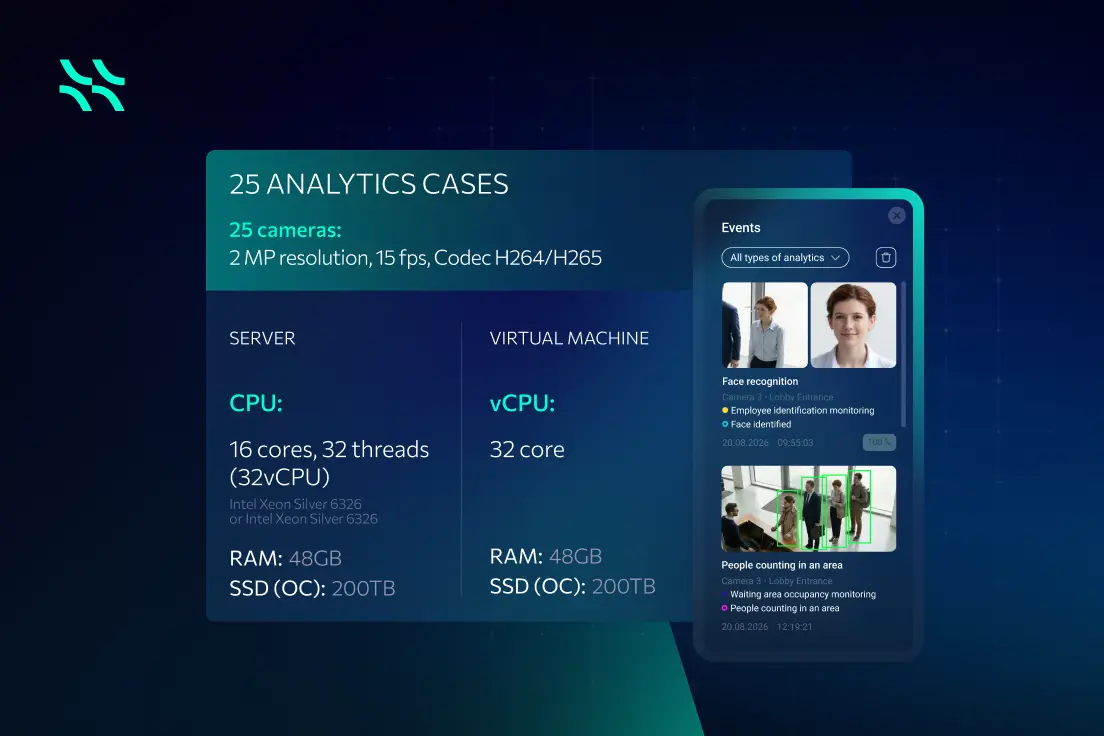
For example, an indicative server profile used for face-recognition workloads can be based on:
- 16 CPU cores;
- 32 threads;
- 48 GB RAM;
- 200 TB SSD.
The exact capacity depends on the analytics workload, stream characteristics and operating conditions, so such a profile should be treated as a reference rather than a universal capacity guarantee.
The broader infrastructure principle remains the same: analytics capacity should be created through dedicated worker nodes that can be added independently as demand increases.
This also allows operators to avoid purchasing a large analytics infrastructure before there is sufficient commercial demand to justify it.
Entry-level analytics vs. scaled analytics
A small analytics rollout behaves differently from a mature analytics service.
Entry-level analytics
At the first analytics stage, the customer pays not only for processing capacity but also for establishing the analytics subsystem itself:
- worker pool;
- analytics database;
- support/storage layer;
- deployment and operational readiness;
- monitoring and capacity margin.
As a result, a relatively small analytics deployment can appear expensive when its CAPEX viewed only against the initial number of analytics cases.
Scaled analytics
Once the subsystem has been established, the economics become more efficient.
The operator already has:
- the analytics workers;
- the database layer;
- the supporting infrastructure;
- the operational processes;
- the integration into the service platform.
Further growth therefore driven primarily by additional worker nodes.
| Analytics stage | Typical cost behavior |
| Initial rollout | Includes subsystem-entry overhead |
| Medium rollout | More efficient infrastructure growth |
| Large rollout | Mainly worker-driven scaling |
This creates an important business message:
The first analytics deployment may look proportionally expensive, but later expansion becomes structurally simpler and more efficient.
Video analytics service as a revenue-enabled layer
For a telecom operator or ISP, analytics should not be viewed purely as an infrastructure expense.
It can become an additional monetization layer on top of the core VSaaS service.
A typical service progression can look like:
Video surveillance → video archive → analytics → vertical-specific services → API-driven integrations
The operator can start with a basic cloud video service and subsequently introduce paid analytics packages.
Examples include:
Retail
- people counting;
- visitor traffic analysis;
- queue monitoring;
- hotspot analysis;
- occupancy monitoring.
Logistics and warehouses
- line-crossing detection;
- restricted-zone monitoring;
- people and vehicle counting;
- bottleneck detection;
- operational event analysis.
Transport and parking
- license plate recognition;
- vehicle counting;
- parking monitoring;
- traffic analysis.
Commercial buildings
- occupancy analytics;
- access-related video events;
- visitor counting;
- perimeter monitoring.
Security
- facial recognition;
- intrusion detection;
- line-crossing detection;
- abnormal activity detection.
This allows the operator to move beyond selling storage capacity and monetize events, insights and business outcomes.
Analytics API creates an additional upsell path
Analytics becomes even more valuable when its output can be integrated with third-party systems.
An analytics API can expose analytics data to systems such as:
- CRM;
- BI platforms;
- HRM systems;
- building management systems;
- retail applications;
- logistics platforms;
- municipal systems.
For example, a retail customer could combine visitor-counting data with sales information in a BI system. A logistics operator could connect analytics events to operational dashboards. A building operator could combine occupancy information with building-management workflows.
This changes the role of analytics from a feature inside a video application to a data service that can support other business systems.
For the operator, that creates additional opportunities for premium service packages and integration revenue.
Why video analytics service should be added gradually?
Analytics does not have to be included in the initial production infrastructure.
A practical rollout strategy is to establish the core video service first and introduce analytics when customer demand and the commercial case justify the additional investment.
Stage 0 — Minimal Demo / PoC
Analytics is normally absent.
It can be introduced in a very limited form when required to demonstrate a particular use case.
The goal at this stage is technical validation, not large-scale analytics capacity.
Stage 1 — Compact Production-Ready Pilot
The focus is on validating the production architecture, service operation and basic video economics.
Analytics is normally not included unless it is part of the pilot commercial objective.
Stage 2 — Commercial Video Service
The operator focuses on establishing the core VSaaS business:
- camera connectivity;
- recording;
- archive;
- customer onboarding;
- billing;
- operational processes;
- archive economics.
Analytics can remain outside the initial deployment.
Stage 3 — Up to approximately 4,000 cameras
At this stage, a dedicated analytics layer can be introduced when commercial demand exists.
The operator establishes:
- analytics workers;
- analytics database;
- support/storage infrastructure;
- analytics service operations.
Stage 4 — Up to approximately 10,000 cameras
The analytics environment can be expanded to support a broader set of use cases and customers.
Growth primarily achieved by increasing worker capacity rather than redesigning the complete analytics subsystem.
A phased approach reduces early CAPEX
The phased model is particularly useful when launching VSaaS because the operator does not need to predict the entire future analytics workload before the service has generated customer demand.
Instead, infrastructure investment follows validated business demand.
A simplified investment logic is:
1: Build the core video platform → validate monitoring and archive economics
2: Grow the customer and camera base → establish recurring VSaaS revenue
3: Introduce analytics → invest in dedicated analytics infrastructure when demand proven
4: Scale analytics → primarily add worker capacity as analytics adoption grows
This approach reduces the risk of purchasing underutilized analytics infrastructure during the early stages of the service.
It also preserves a clean technical path to advanced services later.
Practical sizing questions before ordering hardware
Before finalizing analytics infrastructure, the operator should establish the intended workload.
At minimum, the sizing exercise should answer:
- How many analytics cases will be active?
- Which analytics cases will be deployed?
- How computationally intensive are those cases?
- How many streams will be analyzed?
- Will analytics run continuously or selectively?
- How much concurrency is expected?
- What operating margin is required?
- Which customers or verticals will use analytics?
- Will analytics data be exposed through APIs?
- What is the expected growth over the next rollout stage?
Only after these questions’re answered should worker capacity be translated into a concrete hardware configuration.
This prevents a common sizing mistake: multiplying the total camera count by an assumed analytics ratio without understanding the actual workload.
Key takeaways about video analytics service launch
Video analytics should be treated as a separate, revenue-enabling infrastructure layer within an AIPIX deployment.
The key principles are:
- Size analytics separately from media recording and archive.
- Camera count alone is not a reliable analytics sizing metric.
- Analytics workload depends on cases, complexity, analyzed streams, concurrency and execution mode.
- The analytics subsystem consists of worker nodes plus DB and supporting storage infrastructure.
- The initial analytics deployment carries a subsystem-entry overhead.
- Once the subsystem exists, further growth primarily achieved by adding worker nodes.
- Providers can introduce analytics selectively rather than across the entire camera estate.
- CPU-based analytics can simplify infrastructure planning and avoid mandatory GPU infrastructure for applicable workloads.
- Monetize analytics as premium services on top of basic VSaaS.
- Analytics APIs can extend the value of the service into CRM, BI, HRM, BMS and other business systems.
- Analytics best introduced after provider has validated the core video service and archive economics.
- Separate dedicated analytics CAPEX from the base media-platform budget.
The core business principle
The operator does not need to build the full analytics infrastructure before there is demand for analytics.
A more efficient strategy is:
Launch the core video service → validate demand → monetize the installed camera base → introduce analytics → scale analytics with customer adoption.
This turns analytics from an upfront infrastructure burden into a controlled, scalable investment that follows revenue opportunities.
Contact our team to discover the business opportunities Aipix-based Video Analytics as a Service can unlock for your telecom business.




 EN
EN  ES
ES  FR
FR  PL
PL  PT
PT